

AI Agents, Ask Anything
Ask your sandboxed deal library in plain language, get answers you can trust, with the source always one click away.
Just Ask It.
Ask the way you'd ask a trusted colleague.
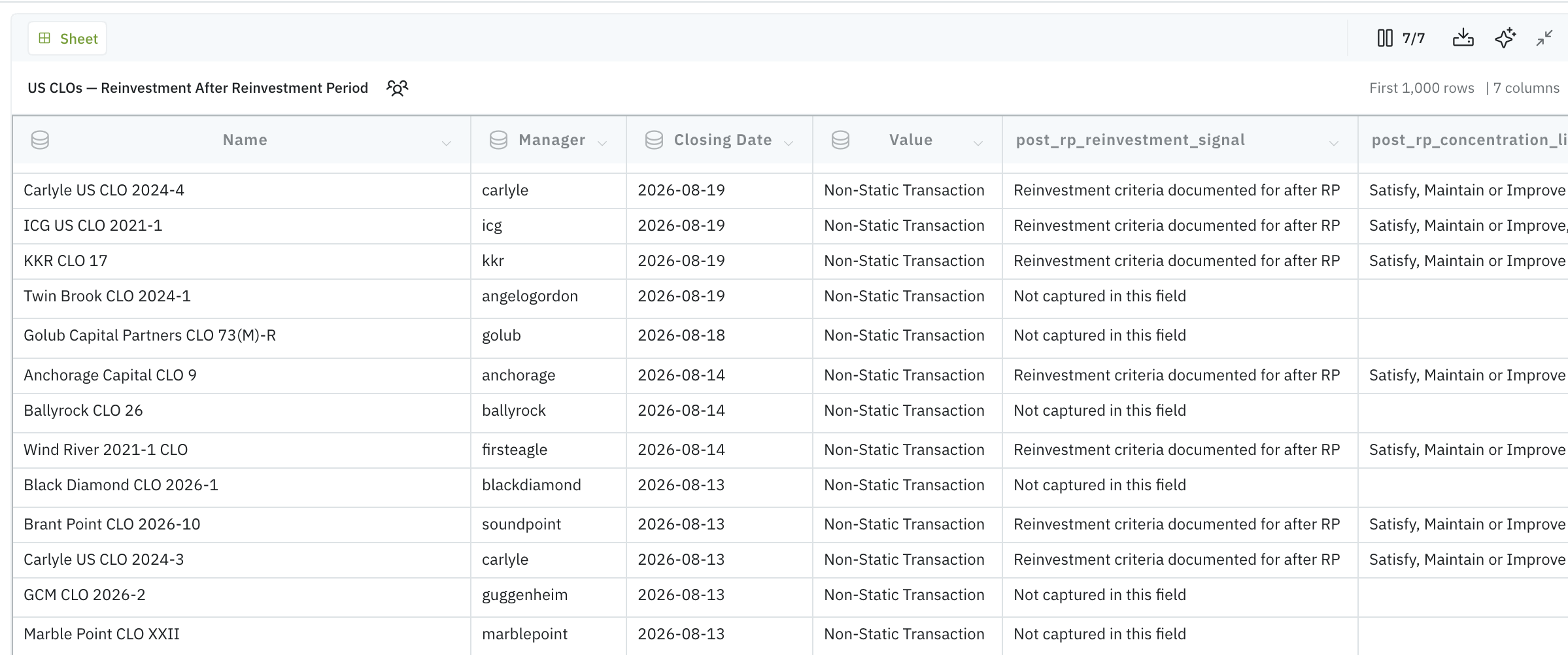
"Which of these deals allow reinvestment after the reinvestment period ends?" The agent searches your sandboxed library, reads the deals, and answers in plain language, with every claim linked back to the passage it came from. No query syntax. No prompt craft.
Checking the answer is a click, not a re-read. If it isn't sure, it says so, and asks rather than guesses.
A Fleet of Agents, Not a Chatbot
This is not chatbot bolted onto a document store. This is a team of agents that search across your whole library, read the documents, and query your data.
They work only over the deals you allow them to see, never the open internet, never another firm's data. What they read is the same analyst-verified CLO datapoints that underpin the rest of Semeris Docs. The AI layer sits on a human-verified foundation, not in place of it. The latest frontier models run in the engine room, and we tune every request so you don't have to think about tokens, models, or infrastructure.
You bring the question; we've built everything behind it.
From Answers to Artifacts
An answer shouldn't die in a chat window. Turn any response into a chart, a sheet, a diagram, or a report. It's one more capability inside Semeris Docs, alongside the extraction, comparison, and market tools you already use.
They are saved to your workspace, you can refine them when you need to, and export to Excel when the modeling starts. Schedule the ones you run frequently, and the analysis that used to cost an afternoon is waiting for you instead in the morning.
Ask once and keep the answer working.
FAQs
What are Semeris AI Agents?
Semeris AI Agents let you ask your own deal-library questions in plain language and get answers you can trust, with the source passage always just one click away. Rather than a single chatbot, they're a fleet of agents: one searches across your whole library, one reads the documents, one queries your data, working only over the deals you allow them to see. They run inside Semeris Docs, alongside the extraction, comparison and market tools you already use..
How do Semeris AI Agents work?
You ask the way you'd ask a trusted colleague, for example, "Which of these deals allow reinvestment after the reinvestment period ends?" The agents search your sandboxed library, read the relevant deals, and answer in plain language, with every claim linked back to the passage it came from. You don’t have to learn query syntax or prompt-craft. If an agent isn't sure, it says so and asks rather than guesses. Answers get saved to your workspace, you can refine them, export to Excel, or turn them into a chart, sheet, diagram, or report. The cherry on top? You can schedule the frequent ones to run automatically.
Are Semeris AI Agents secure, and do they train on my documents?
They're scoped to your permissions and yours alone. They are sandboxed to the deals you allow for them to see. They never ramble on the open internet or sneak into another firm's data. Semeris is SOC 2 certified, and your private documents never train a model. If your firm's policy rules out AI, it can be switched off entirely. The AI doesn't replace your judgment.
Can I ask questions about my deal library in plain language?
How are Semeris AI Agents different from a chatbot?
Can Semeris AI Agents export to Excel or build charts?
Yes, that's the core of Semeris AI Agents. You ask in natural language and get a plain-language answer grounded in your own documents, with one-click source traceability. No query language, no prompt engineering is needed from your end.
A chatbot is a single general model that answers questions from a database on which it was trained. Semeris AI Agents are a coordinated fleet; they search, read, and process structured data. They work only in your sandboxed, permissioned deal library, with every answer linked to its source. The design goal is answers you can defend in a credit committee, not plausible-sounding text.
Yes. An answer doesn't have to die in a chat window. You can turn any response into a chart, a sheet, a diagram, or a report, save it to your workspace, refine it, and export to Excel. You can even schedule the analyses you run often so they're ready in the morning.